How to Read a Crypto Transaction Before You Sign It
Learn how to read crypto transactions, understand wallet prompts, and spot red flags before signing. Beginner guide with Etherscan walkthrough.
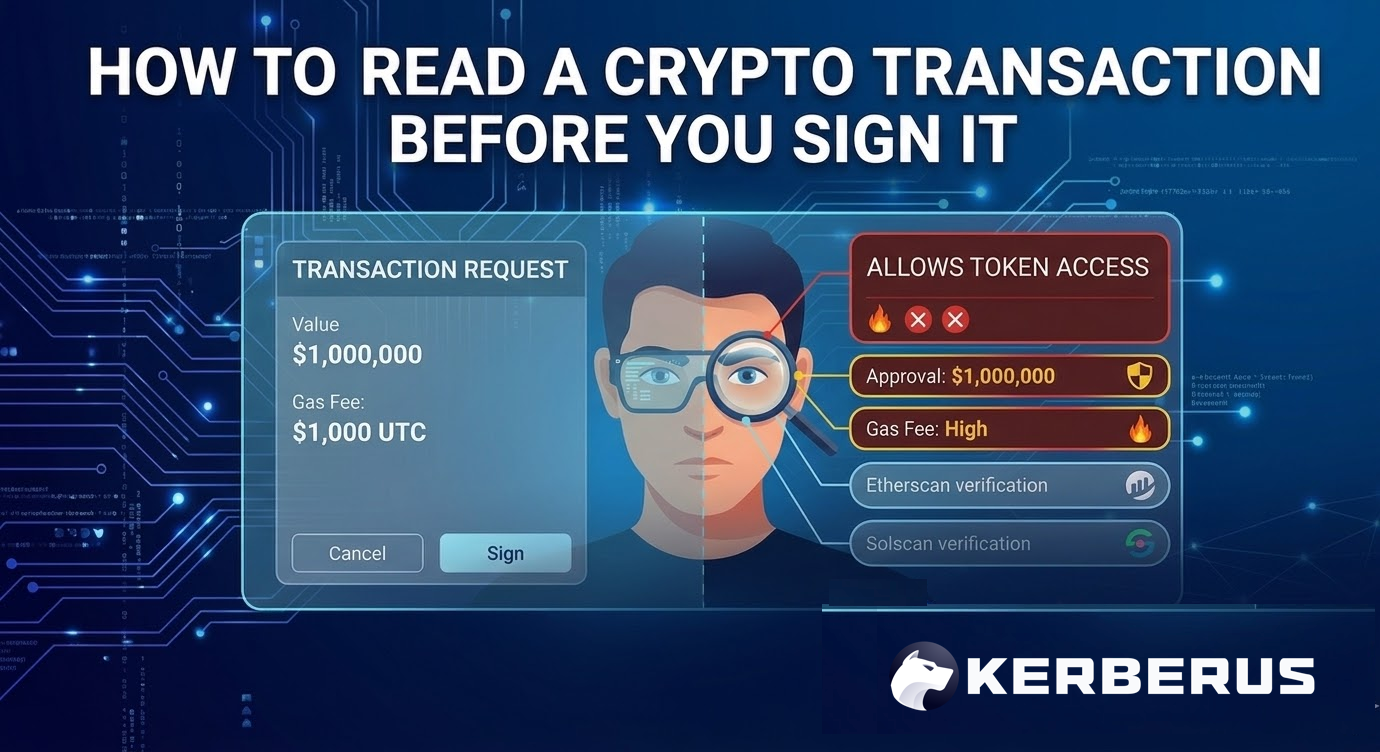
- Every crypto transaction contains readable details, verifiable on public block explorers like Etherscan and Solscan.
- The most dangerous moment in crypto is not after a transaction but before you sign one, when your wallet asks you to approve something you may not fully understand.
- Learning to read what your wallet is actually asking you to approve is the single most effective way to avoid wallet drainers, malicious approvals, and blind signing exploits.
Introduction
You have just connected your Web3 wallet to a new DeFi site and a popup appears asking you to “Approve” something. The button is right there. You have done this dozens of times before. But do you actually know what you are approving?
Most people don’t. And that’s exactly how crypto wallet drainers steal funds. Not by brute-forcing passwords or cracking encryption, but by getting users to sign something they never bothered to read.
According to CertiK’s security data, approval-based exploits accounted for over $200 million in losses during 2024-2025 alone. The transactions themselves were technically valid. The signatures were real. The wallets worked as designed. The problem was that the person clicking “Approve” had no idea what they were actually authorizing.
This guide walks you through how to read a crypto transaction from the ground up: what each piece of data means, what your wallet is really asking when it shows you a popup, and how to use free tools to verify everything yourself. If you are new to crypto and want a broader overview first, check out the Web3 security beginner guide.
How to Read a Crypto Transaction Before You Sign It
Download the complete PDF guide to reading on-chain transaction prompts, spotting red flags, and verifying details with Etherscan and Solscan.
What is a crypto transaction?
A crypto transaction is a signed instruction that gets permanently recorded on a blockchain. Think of it as a digital receipt that can never be altered or deleted. When you send cryptocurrency to someone, swap tokens on a decentralized exchange, or mint an NFT, you create a transaction.
Here is the part that trips people up: unlike a bank transfer, every crypto transaction is public. Anyone can look up the details using a block explorer. The sender address, receiver address, amount, fee, and timestamp are all visible to anyone who wants to check.
The flip side of that transparency is permanence. Once a transaction is confirmed on the blockchain, there is no undo button. The network executes exactly what you signed, whether you meant to sign it or not. That is why reading and understanding transactions before you approve them matters more than almost any other security habit in crypto.
Anatomy of a crypto transaction
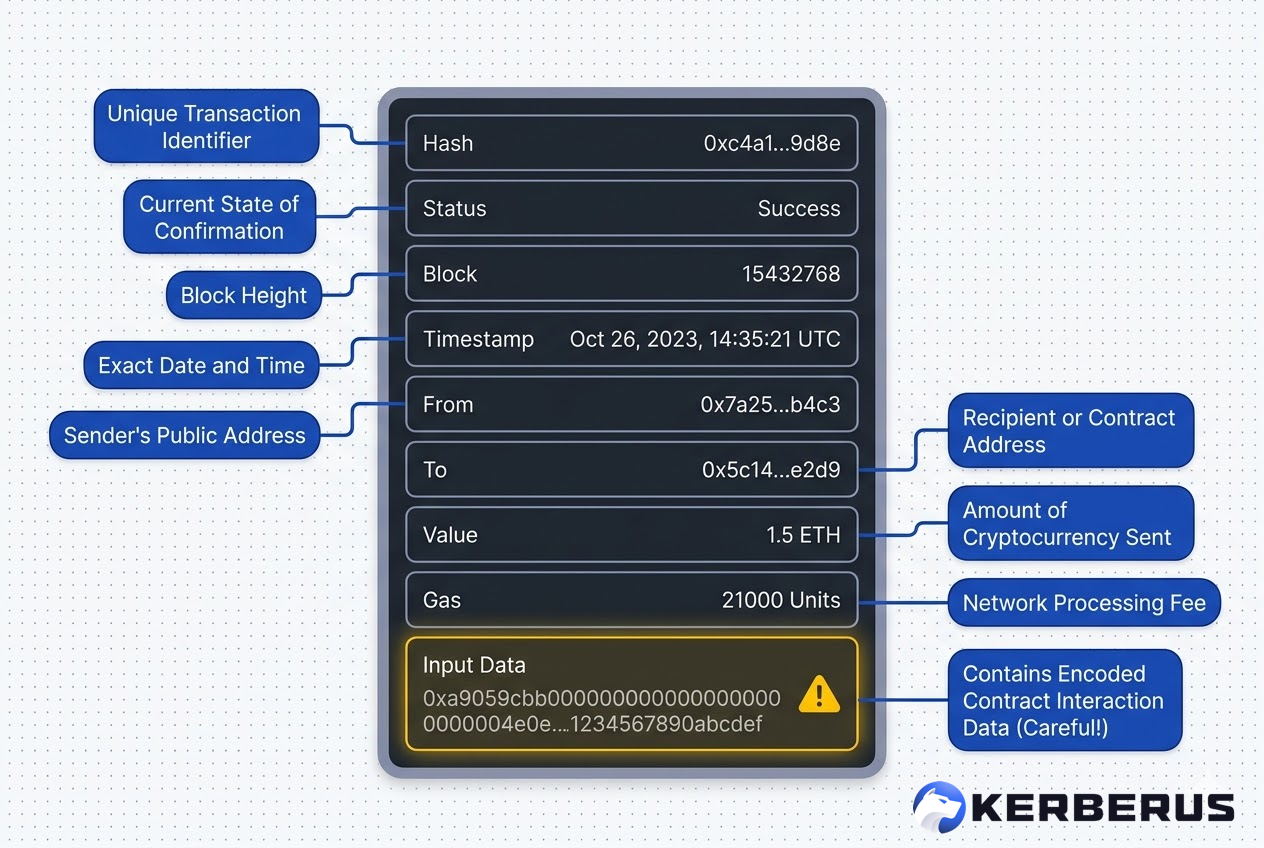
Every crypto transaction, whether on Ethereum, Solana, or any other chain, shares the same basic structure.
Here is what each field means in plain language. Let’s use a real transaction as an example, which you can find here on Etherscan.
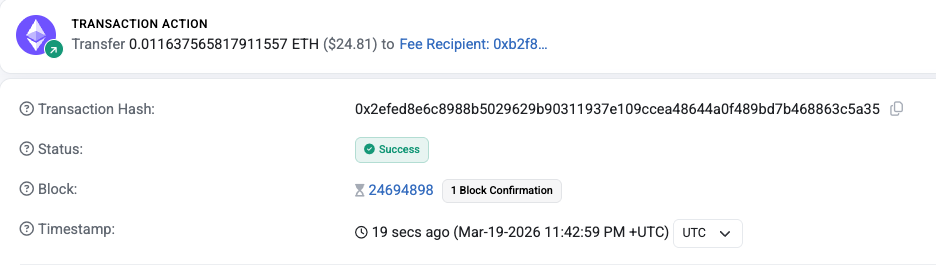
Transaction hash (TXID): is the unique ID for that specific transaction. Think of it like a tracking number for a package. If you ever need to look up a transaction or prove it happened, this is the string you search for on a block explorer.
Status: tells you whether the transaction succeeded, failed, or is still pending. A “success” status means the blockchain accepted and recorded it. A “failed” status means it was rejected, but you still pay the gas fee. A “pending” status means it has not been confirmed yet.
Block number: is which block on the chain your transaction was included in. Each block is like a page in the ledger.
Timestamp: is when the transaction was confirmed. Useful for tracking when something happened or for tax records.

The From address is the wallet that initiated and signed the transaction. This is your wallet address if you sent it.
The To address is the destination where the funds are being sent. For a simple transfer, this is the recipient’s wallet. For a smart contract interaction, this is the contract’s address, not a person.
Value is the amount of crypto transferred. This can be zero, and that is worth paying attention to (more on this below).

Gas fee is what you pay the network to process your transaction. On Ethereum, gas fees fluctuate based on how busy the network is. On Solana, fees are typically a fraction of a cent, payable in SOL, its native currency.

Input data is the field most beginners ignore and most scammers rely on. For a simple ETH transfer, input data is empty. For a smart contract call, it contains the actual instructions being executed, like “transfer this token” or “approve unlimited spending.”
If you cannot read this field, you are essentially signing a document without reading the fine print.
Let’s review quickly again:
Simple transfers vs smart contract interactions
Not all transactions are created equal. The difference between a straightforward transfer and a smart contract interaction is where almost all the danger lives.
A simple transfer is when you send crypto from your wallet to another wallet. You see the recipient address and the amount. What you see is what you get. Sending 0.5 ETH to your friend’s address is about as straightforward as crypto gets.
A smart contract interaction is fundamentally different. When you swap tokens on a decentralized exchange like Uniswap or Raydium, provide liquidity to a DeFi protocol, or mint an NFT, your wallet is sending instructions to a smart contract. The contract then executes whatever those instructions say.
Here is the bit that catches beginners off guard: many smart contract transactions show a value of 0 ETH. That looks harmless. Zero ETH means nothing is being sent, right?
Wrong. A 0 ETH transaction with input data is calling a function on a smart contract. That function might be swapping your tokens, granting approval for another contract to spend your funds, or something far worse. The “value” field only shows the raw ETH being sent. It says nothing about what the contract is doing with your tokens behind the scenes.
This is exactly the mechanism behind most Web3 security threats that target everyday users. The transaction looks innocent because the number says zero. The actual damage is hidden in the input data.
What your wallet is really asking when it says “Approve”
When a popup appears in MetaMask, Phantom, or any other wallet, you are being asked to do one of three things.
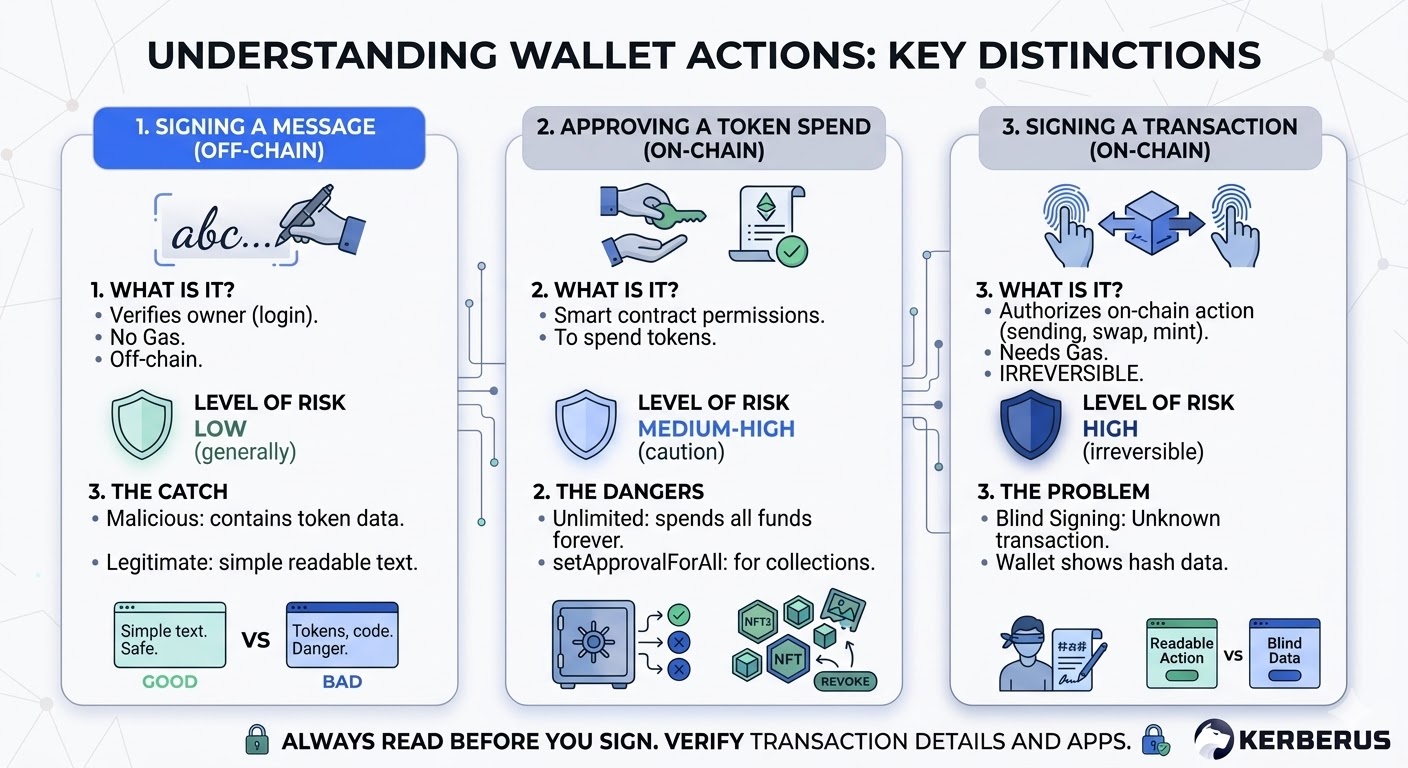
Understanding the difference between them is crucial for any crypto beginner.
1) Signing a message (off-chain)
Sometimes a site asks you to “Sign” a message. This does not cost gas and does not create an on-chain transaction. It is typically used to verify you own a wallet, like logging in. Generally low risk.
But here is the catch: some malicious approval schemes disguise themselves as innocent message signing. If a “sign message” request contains structured data with token amounts or contract addresses, treat it with suspicion.
Legitimate login prompts usually show a simple human-readable message like “Sign in to [site name].“
2) Approving a token spend (on-chain)
This is the big one. When a DeFi protocol needs to move your tokens, it first asks your permission via a token approval. You are granting a specific smart contract the right to spend a specific token from your wallet.
The danger comes from unlimited approvals. Many protocols request permission to spend an unlimited amount of a token to save you gas on future transactions. That sounds convenient, but it means the contract can move every single one of those tokens out of your wallet at any time, forever, unless you revoke the approval.
The setApprovalForAll function is even more dangerous. It grants a contract access to every NFT in a collection you hold. If the contract is malicious, or gets exploited later, your entire collection disappears.
3) Signing a transaction (on-chain)
This is the most familiar type: you are authorizing a specific on-chain action like sending crypto, executing a swap, or minting. A gas fee is required. The action is irreversible once the network confirms it.
The problem is when your wallet cannot decode the transaction into human-readable language.
This is called blind signing, where the wallet shows a hash or “data present” instead of a clear description like “Swap 100 USDC for 0.04 ETH on Uniswap.” You are essentially signing a legal document that you cannot read. According to Coin Bureau, blind signing remains one of the most exploited wallet vulnerabilities as of 2025.
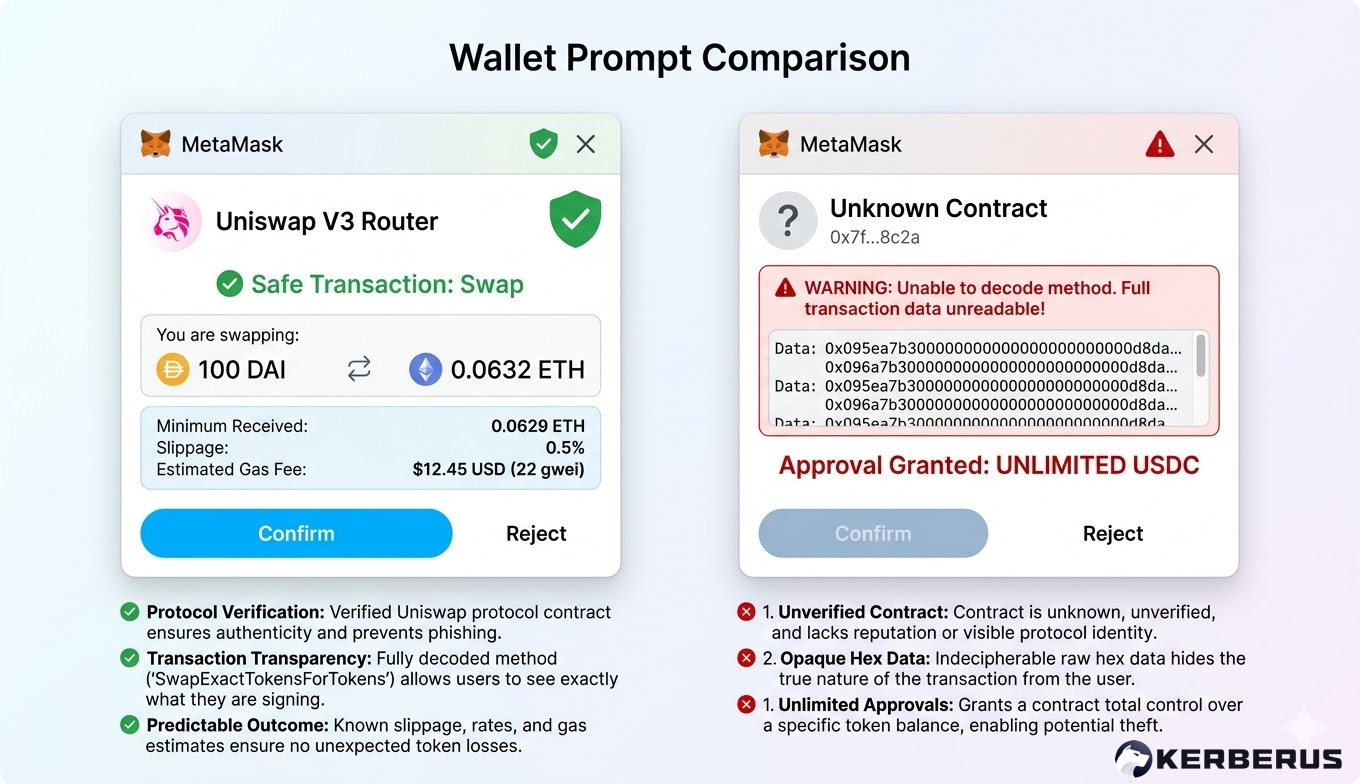
Red flags to watch for before signing
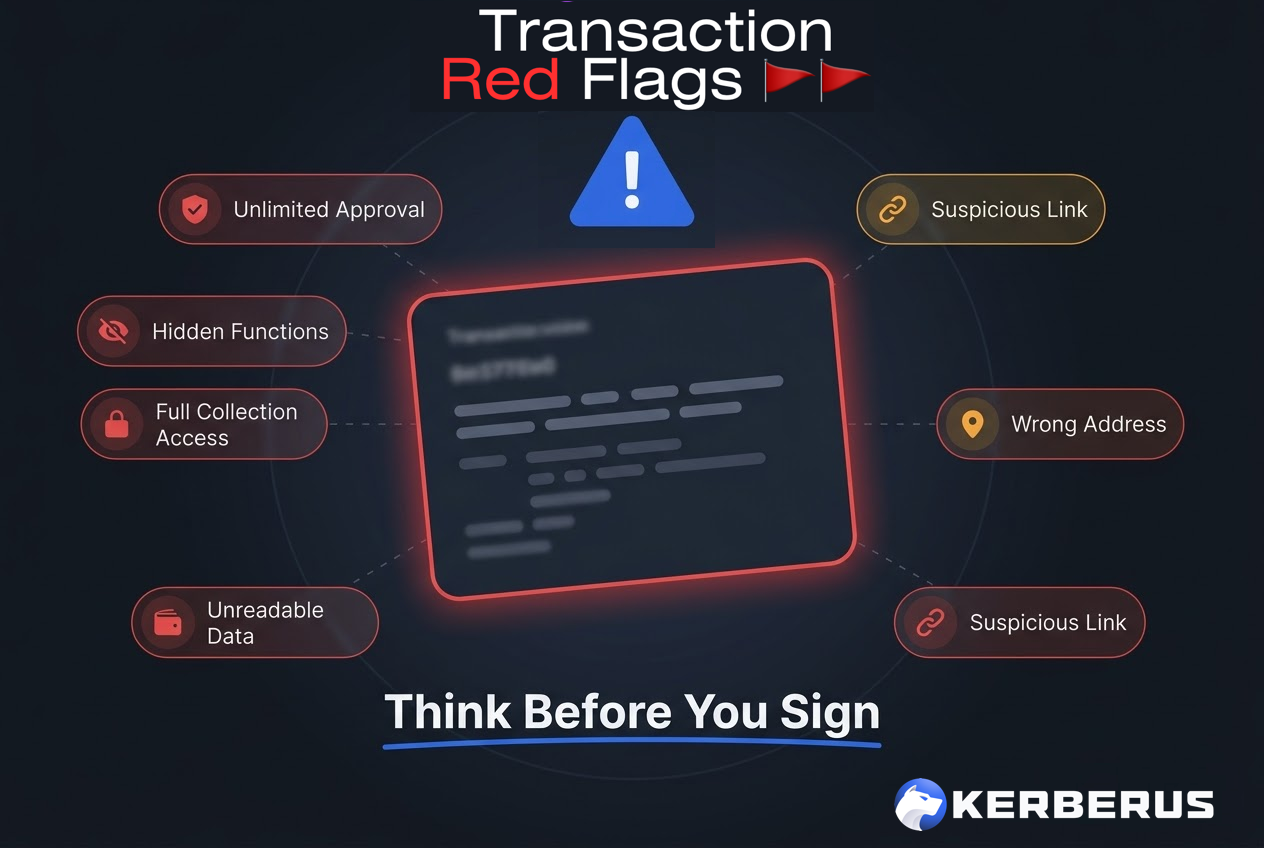
Before you click that Approve or Confirm button, run through this mental checklist. These are the warning signs that something is off.
-
Unlimited token approval from an unfamiliar contract. If a site you have never used before is requesting permission to spend an unlimited amount of your tokens, stop. Legitimate protocols may request this, but you should verify the contract address independently before approving.
-
A “0 ETH” transaction with complex input data. As explained above, a zero-value transaction that is calling a smart contract function is not harmless. Check what function is being called.
-
setApprovalForAll requests. Any prompt asking for approval over all your NFTs in a collection should be treated with extreme caution. Very few legitimate operations require this.
-
Wallet shows a hash instead of a readable description. If your wallet cannot decode what you are signing into plain language, that is a red flag. Consider switching to a wallet with better transaction decoding, or use a security extension that translates the data for you.
-
Urgency pressure. If a site is telling you to “sign now or miss out” on a mint, an airdrop, or a token sale, slow down. Scammers manufacture urgency because it works. Legitimate opportunities do not disappear in 60 seconds.
-
Transaction destination does not match the site. If you are on a site claiming to be Uniswap but the contract address in your wallet prompt does not match Uniswap’s verified contract, close the tab.
-
You arrived at the site through a DM, a reply on X, or an unsolicited link. Most crypto wallet drainer attacks start with social engineering. If someone sent you a link, assume it is malicious until proven otherwise.
How to use a block explorer to verify transactions
Block explorers are free, public tools that let you look up any transaction on a blockchain. Learning to use one takes about two minutes and gives you the ability to independently verify anything that happens to your wallet.
Etherscan (Ethereum and EVM chains)
Etherscan is the most popular block explorer for Ethereum and is the model for most other chain explorers (BscScan, Arbiscan, ZKScan and others work almost identically).
Step 1: Copy the transaction hash (TXID) from your wallet. You can usually find this in your transaction history.
Step 2: Go to etherscan.io and paste the TXID into the search bar.
Step 3: Read the transaction page. Confirm the status (success/fail/pending), check the From and To addresses, verify the value, and note the gas fee.
Step 4: Click on “Click to show more” to reveal the Input Data field.

For a simple transfer, this will be empty. For a smart contract interaction, this shows the function that was called. Etherscan often decodes the input data into a readable format, showing you exactly which function was executed and with what parameters.
If the transaction interacted with a verified contract, Etherscan displays the contract name next to the To address. If the contract is unverified, that is worth noting, legitimate projects almost always verify their contracts.
Solscan (Solana)
For Solana transactions, Solscan (acquired by Etherscan in 2024) serves the same purpose. Paste your transaction signature into the search bar and you will see a similar breakdown: status, signer, instructions, token transfers, and fees. Solana transactions can contain multiple instructions in a single transaction, so pay attention to the full list rather than just the top-line summary.
Other popular explorers include Blockchain.com for Bitcoin and SolanaFM as an alternative Solana explorer.
How Kerberus helps you read transactions before you sign
The whole point of reading transactions is to catch the bad ones before they execute. But expecting every user to manually decode input data and cross-reference contract addresses is not realistic, especially under pressure.
Kerberus Sentinel3 is a free Web3 security browser extension that works as a translation layer between you and your Web3 wallet. When you are about to interact with a Web3 site or sign a transaction, Sentinel3 scans the Web3 site and the transaction in real time, then translates what is happening into a clear warning if something looks wrong. It catches wallet drainers, transaction poisoning attempts, phishing sites, and suspicious contract interactions before you approve them, with a 99.9% detection rate across 1,000+ EVM chains and Solana.
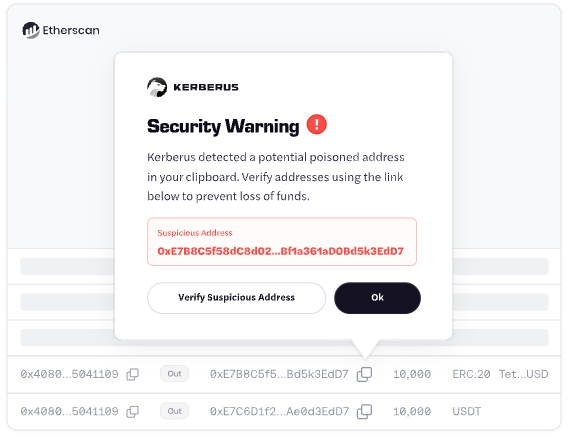
Kerberus acquired Fire specifically for its transaction translation feature, which converts raw transaction data into human-readable summaries. Combined with Sentinel3’s real-time detection, users get a clear picture of what they are signing without needing to read Etherscan manually for every interaction.
If Sentinel3 misses something, users are covered for up to $30,000 in qualifying losses.
Install the free browser extension here.
FAQ
What is a transaction hash (TXID)?
A transaction hash is a unique string of letters and numbers that identifies a specific transaction on the blockchain. Think of it as a receipt number. You can paste it into a block explorer like Etherscan to see every detail of that transaction, including its status, the addresses involved, and the amount transferred.
Why does my transaction show 0 ETH?
A 0 ETH value transaction does not mean nothing happened. It usually means you interacted with a smart contract, like approving a token spend, swapping tokens through a DEX, or minting an NFT. The actual token movement is handled by the contract, not reflected in the ETH value field. Check the “Token Transfers” tab on Etherscan to see what actually moved.
What does “pending” mean on a blockchain transaction?
Pending means your transaction has been broadcast to the network but has not been included in a block yet. This usually happens during periods of high network congestion or when the gas fee you set was too low. On Ethereum, you can speed up a pending transaction by resubmitting it with a higher gas fee using the same nonce.
Is it safe to share my wallet address?
Yes. Your public wallet address is designed to be shared. It is how people send you crypto. Anyone can view your transaction history and balance by searching your address on a block explorer, but they cannot access or move your funds without your private key. Never share your private key or seed phrase with anyone.
How do I revoke a token approval I already signed?
Use a tool like Revoke.cash to review and revoke active token approvals. Connect your wallet, sort by most recent, and revoke any approvals you no longer need, especially unlimited ones from contracts you no longer use. Revoking an approval costs a small gas fee. For a broader overview of wallet maintenance habits, see the wallet hygiene guide.
About Kerberus

Kerberus is a leading Web3 cybersecurity company protecting users across 1000+ chains with real-time scam detection and MEV defense. Its team has led and advised security work across top crypto ecosystems since 2023, with zero losses and 99.99% safety for its 250,000 users. It also offers up to $30,000 in coverage on user funds.
Kerberus acquired both Fire and Pocket Universe in recent years, thereby consolidating the best Web3 security tools under its banner, in order to bring crypto users the best possible defense against scammers and hackers.
Kerberus Sentinel3 is a real-time Web3 security engine which users can install as a browser extension in seconds. It helps users stay safe by automatically detecting phishing, wallet drainers, and social engineering threats across chains, helping crypto users identify and block scam attempts before irreversible losses occur.
Ready to stop signing blind? Get Sentinel3 and join 250k+ users who have experienced zero losses with real-time transaction protection. Learn more about protecting yourself from wallet drainers and the top Web3 security threats in 2026.
Written by:
Werner Vermaak is a Web3 author and crypto journalist with a strong interest in cybersecurity, DeFi, and emerging blockchain infrastructure. With more than eight years of industry experience creating over 1000 educational articles for leading Web3 teams, he produces clear, accurate, and actionable organic material for crypto users.
- •8+ years in crypto & blockchain journalism
- •1000+ educational articles for leading Web3 teams
- •Former content lead at CoinMarketCap, Bybit, OKX
Related Guides
See more guides
Bitcoin 101 For Beginners: BTC’s Past, Present and Future
Mar 19, 2026 • 4 minutes read
Wallet Hygiene Guide: How To Keep Your Crypto Safe
Mar 18, 2026 • 4 minutes read

Solana 101: A 2026 Guide to SOL and Its Ecosystem
Mar 13, 2026 • 4 minutes read
Crypto and Web3's 12 Biggest Narratives in 2026
Feb 20, 2026 • 4 minutes read
Install once & immediately get protected from scams, phishing and hacks. Zero losses for 250k+ users in 3 years. Now with up to $30,000 in coverage.